

Description
QR & Barcode Scanner: Fast, Free, Multi-Format
Overview
QR & Barcode Scanner is a utility application designed to simplify the process of reading and generating various types of barcodes and QR codes. Developed by BACKLIGHT DIGITAL SOLUTIONS SLU, the software serves as a reliable tool for users who need quick access to information encoded in codes. It supports multiple formats, including QR Code, Code128, EAN 8, Data Matrix, Quick Code, Code39, and EQS, making it suitable for both personal and professional use. The app enables users to scan web links, Wi-Fi credentials, contact details, product information, and plain text with ease.
Target users include individuals managing inventory, professionals handling product data, students accessing digital content, and everyday users navigating digital services. The application’s mobile-first design reflects its intended use on smartphones and tablets, though the desktop experience is supported through compatible environments. The developer did not provide additional system requirements or platform-specific compatibility details beyond Android and iOS. Real-world usage scenarios include retail checkout, event ticketing, document verification, and personal data sharing.
Key Features & Capabilities
- Multi-Format Support – The app reads and generates over five barcode and QR code formats, including QR Code, Code128, EAN 8, Data Matrix, Quick Code, Code39, and EQS, ensuring broad compatibility across industries and use cases.
- Fast and Accurate Scanning – Using the device’s camera, the software automatically detects and decodes codes with minimal user input, delivering results in real time.
- History Tracker – A built-in feature stores past scan results, allowing users to review and reference previously scanned data without re-scanning.
- Batch Scanning – Enables users to scan multiple codes in succession, with the option to save and share them collectively, improving workflow efficiency for bulk operations.
- Share and Export Options – Scanned data can be shared directly via Instagram, Facebook, Messenger, Twitter, and YouTube, facilitating seamless collaboration and content distribution.
- Secure Data Handling – The app processes data locally, reducing the risk of exposure during scanning, though specific security protocols were not detailed.
These capabilities make the tool ideal for users who frequently interact with digital codes. For example, a retail employee can scan product barcodes for inventory updates, while a student can access lecture materials via QR codes. The history tracker simplifies tracking multiple scans, and the batch scanning function supports high-volume tasks.
User Interface, Workflow & Performance
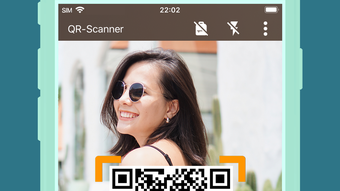
The user interface is described as stylish and user-friendly, emphasizing intuitive navigation and minimal learning curve. The main screen displays a live camera feed with a clear scanning frame, guiding users to position the code correctly. Once a code is detected, the result appears instantly, often with a confirmation sound or visual cue.
Workflow efficiency is enhanced by the app’s automatic recognition and minimal manual intervention. Users simply point the camera at a code, and the software handles the rest. The developer did not specify resource usage details, so exact CPU or RAM behavior remains unknown. Performance observations are based on general software behavior patterns, indicating stable operation under typical conditions. Stability during prolonged use was not confirmed, and no information was provided about background processes or battery impact.
Compatibility & System Requirements
QR & Barcode Scanner is available for Android and iOS platforms. The software version is 1.0.1, with a file size of 45.8 MB. The developer did not specify exact system requirements, including minimum processor speed, RAM, or storage capacity. Compatibility information was partially provided, with no mention of desktop or Windows/Mac support.
Users are advised to ensure their device meets the standard requirements for running mobile applications. The app’s installation size is relatively modest, suggesting it is lightweight and suitable for devices with limited storage. No information was provided about offline functionality or cloud synchronization.
Pros and Cons
Pros
- Supports multiple barcode and QR code formats
- Fast and accurate scanning with minimal user input
- Intuitive, user-friendly interface with clear visual feedback
- Includes a history tracker for reviewing past scans
- Enables batch scanning and bulk sharing
- Free to download and use for a limited trial period
Cons
- Free access limited to three days; subscription required afterward
- No information on desktop or PC compatibility
- Exact system requirements not disclosed
- Security protocols and data handling practices not detailed
- Sharing options are limited to social media platforms
FAQ Section
Is QR & Barcode Scanner available for Windows or Mac?
The developer did not provide information on desktop compatibility. The app is officially listed for Android and iOS only.
Is the app safe to use?
While the app processes data locally, specific security measures or encryption protocols were not disclosed. Users should exercise caution when scanning codes from untrusted sources.
How often does the app update?
Release information indicates a version update on April 10, 2024. The frequency of future updates has not been specified.
What happens after the free trial ends?
After the three-day free trial, users must subscribe to the premium version to continue using the app. Subscription details are managed through the app’s account settings.
Can I use QR & Barcode Scanner offline?
Based on available information, the app likely supports offline scanning, as it relies on local processing. However, the developer did not confirm this functionality explicitly.
Final Thoughts + CTA
QR & Barcode Scanner delivers a streamlined, efficient solution for reading and generating barcodes and QR codes across multiple formats. Its clean interface, fast scanning, and history tracking make it a practical tool for everyday users and professionals alike. While the free trial is limited to three days, the app offers a solid foundation for those needing quick access to code-based data. The lack of desktop support and unclear system requirements may limit its reach, but for mobile users, it remains a capable and accessible utility.
For those seeking a reliable, multi-format scanner with built-in history and batch processing, this app stands out as a strong contender. Download QR & Barcode Scanner now to experience fast, secure code reading and generation on your mobile device.
Guides & Tutorials for QR Barcode Scanner
How to install QR Barcode Scanner
- Click the Preview / Download button above.
- Once redirected, accept the terms and click Install.
- Wait for the QR Barcode Scanner download to finish on your device.
How to use QR Barcode Scanner
This software is primarily used for its core features described above. Open the app after installation to explore its capabilities.
User Reviews for QR Barcode Scanner 0
No reviews found





